
Run / AI & Automation
Automate what should be predictable. Use AI where flexibility adds value.
Orivion provides business process automation and AI integration from Dubai for UAE and international businesses. Not every problem needs AI, and not every workflow should be left to a rule. We look at the work itself, then choose the simplest approach that is reliable: rule-based automation where steps are predictable, AI where the work involves language, documents or judgement, and agents only where a task genuinely needs several steps and tools. Human review stays wherever an error would carry a cost.
The problem
The work that should not need a person
Most organisations have more automation potential in their inboxes and spreadsheets than in any AI roadmap.
- Staff re-keying data from emails and documents into systems
- Approvals that wait in someone's inbox
- CRM records updated late, or not at all
- The same research or reporting assembled by hand every week
- Knowledge scattered across documents, drives and chat threads
- Customer questions answered from memory instead of a source
- AI pilots that impressed in a demo and never reached production
Why it matters
AI where appropriate. Automation where sufficient. Human review where necessary.
Traditional automation is the right tool when the steps and rules are known: move data, route an approval, send a notification, update a record. It is cheap to run and easy to audit.
AI is useful when the work involves language, documents, classification, extraction, search or flexible decision support. Agents become useful when a task needs several steps or tool calls, and they need stronger controls because they act, not just answer.
Frameworks such as the NIST AI Risk Management Framework and its Generative AI Profile treat risk as something managed across the whole lifecycle, not checked once at launch. We follow that approach: define the use, measure quality before release, keep people in control of consequential decisions, and monitor after deployment.
Choosing the approach
Three kinds of automation, chosen by the work.
The decision is made per workflow, and many solutions combine all three with a person at the end.
Rules
- Predictable steps
- Structured data
- Routing and approvals
- Notifications
AI
- Documents and language
- Classification
- Extraction
- Search and summarising
Agents
- Multi-step tasks
- Several tools
- Bounded permissions
- Stronger oversight
People
- Consequential decisions
- Exceptions
- Quality review
- Accountability
Capabilities
What Orivion can deliver.
Workflow automation, document processing, AI assistants and agents, with controls built in.
Workflow automation
- Business process automation
- n8n, Make and Zapier
- API automation
- Workflow orchestration
- Scheduled and event-driven workflows
CRM and communication
- CRM updates and enrichment
- Lead routing
- Approval flows
- Notifications and escalations
- Email processing
Documents
- OCR
- Data extraction
- Classification
- Validation against rules
- Document generation
- Routing
AI applications
- AI assistants
- Internal knowledge assistants
- Retrieval-augmented generation (RAG)
- Semantic and vector search
- LLM integration into existing products
Agents
- Task-oriented agents
- Tool and API use
- Bounded permissions
- Human hand-off
Governance
- Human approval steps
- Evaluation sets
- Monitoring and logging
- Access controls
- Fallback handling
- Guardrails
Use cases
What clients hire this for.
Representative problems this service is used to solve.
Document intake and extraction
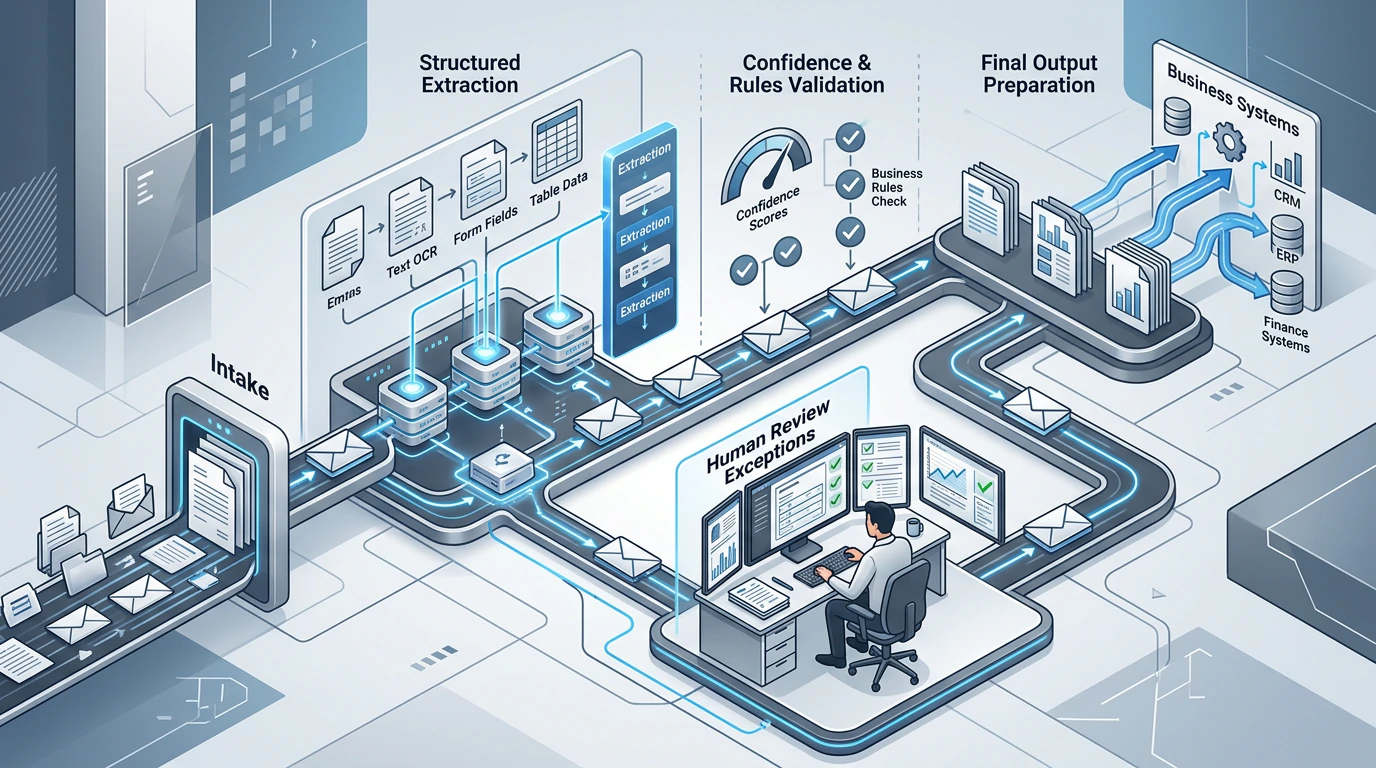
Read invoices, forms or applications, extract fields, validate them against rules and send exceptions to a person.
Customer support assistant
Answer common questions from your approved content, cite the source, and hand over to a person with the conversation attached.
Internal knowledge search
Let staff ask questions across policies, proposals and documentation, with answers limited to what they are allowed to see.
Lead qualification
Enrich and score new enquiries, route them to the right owner and create follow-up tasks automatically.
Approval routing
Replace email approvals with a workflow that records who approved what, when, and against which policy.
Reporting workflows
Assemble recurring reports from several systems on a schedule, with anomalies flagged for review.
Document generation
Produce proposals, contracts or summaries from templates and structured data, reviewed before sending.
Research assistance
Gather and summarise information for analysts, with sources shown so conclusions can be checked.
Methodology
From candidate process to a monitored system
We start with the process, not the model. Many projects finish with simpler automation than first expected, and that is a good outcome.
01
Process discovery
Map the workflow, volumes, exceptions and who is accountable for the result.
02
Candidate assessment
Estimate effort saved, risk and data readiness for each automation candidate.
03
Rules, AI or agent
Choose the simplest approach that is reliable for each step.
04
Data and system mapping
Identify sources, permissions and the systems to read from and write to.
05
Prototype
Build the narrowest useful version and run it against real examples.
06
Integration
Connect to CRM, email, storage and business systems with proper credentials.
07
Human control design
Decide where people review, approve or override, and design those screens.
08
Evaluation
Measure accuracy and failure modes on a representative test set before release.
09
Deployment
Release in stages, starting with a limited group or volume.
10
Monitoring
Track quality, cost, errors and drift, with alerts and a review cadence.
Deliverables
What you receive.
The exact set depends on scope. These are typical for an engagement of this kind.
- Automation opportunity assessment
- Process and data maps
- Working workflows or AI application
- Evaluation set and quality results
- Human review and override screens
- Monitoring dashboards and alerts
- Access and permission model
- Operating documentation and runbooks
- Training for the people who use and oversee it
Technology
Platforms chosen for the problem.
Platform choices follow data location, security needs, volume and cost. We work with:
Automation
- n8n
- Make
- Zapier
- Power Automate
- Custom workflow services
Models
- OpenAI
- Anthropic Claude
- Azure OpenAI
- Google Gemini
- Open-weight models where suited
Retrieval
- Vector databases
- pgvector
- Hybrid search
- Embeddings
Documents
- OCR services
- Azure AI Document Intelligence
- AWS Textract
Evaluation and monitoring
- Evaluation datasets
- Tracing
- Cost and usage monitoring
Security and governance
Controls that make AI usable in a real business
Every AI system we deploy has a defined purpose, a measured quality level and a person accountable for it.
Human approval
People approve actions with legal, financial or customer consequences before they happen.
Evaluation
Quality is measured on representative examples before release and re-measured after changes.
Access control
Assistants only retrieve what the user is permitted to see, and agents only use the tools they are granted.
Auditability
Inputs, outputs, sources and actions are logged so decisions can be reviewed.
Fallbacks
When confidence is low or a system fails, work routes to a person instead of guessing.
Data handling
Data residency, retention and provider terms are reviewed before any data is sent to a model.
Engagement models
How this is usually delivered.
Usually starts with a short assessment of candidate processes, followed by a managed project for the first workflows. Ongoing improvement can run through a dedicated team or support plan.
Proof
How we would approach it.
Capability demonstrations show how Orivion would approach a problem. They are not client projects and carry no client results.
Related capabilities
Services that usually connect to this one.
- RunCRM, Sales & Customer SystemsThe customer journey from first enquiry to retention, connected in one system.
- RunData & Business IntelligenceData pipelines, trusted metrics, dashboards and analytics the whole business can rely on.
- BuildSoftware Engineering & CloudCustom applications, APIs, integrations, cloud and DevOps designed around your operation.
FAQ
Questions buyers ask
What information do you need to assess an automation project?
Bring one workflow, sample inputs with sensitive data removed, the systems involved, typical volume and the exceptions staff handle. We assess whether rules, AI or a bounded agent fits, where people must review the result, and how quality and operating cost will be measured.
How do we decide whether to use AI or ordinary automation?
If the steps and rules are predictable, ordinary automation is usually cheaper, faster and easier to audit. AI makes sense when the input is language or documents, or when the task needs judgement that rules cannot express. We make the choice per step and explain it.
Is our data safe if we use a language model?
It depends on the provider, the contract and how the system is built. We review data residency, retention and training terms, use enterprise endpoints where needed, restrict what data is sent, and keep access controls in the retrieval layer.
What is RAG and do we need it?
Retrieval-augmented generation means the model answers using documents retrieved from your own sources, rather than from its general training. It is the usual approach for internal knowledge assistants and support assistants that must cite approved content.
Are AI agents ready for production?
For bounded tasks with clear permissions, logging and human approval of consequential actions, yes. For open-ended autonomy in high-risk processes, we recommend starting with assistance and review, then widening scope as evidence builds.
How do you measure whether it works?
Before release we test on a representative set of real examples and agree acceptable accuracy with you. After release we monitor error rates, overrides, cost and user feedback.
What happens when the AI gets something wrong?
The system is designed for it: low-confidence results route to a person, consequential actions need approval, and every output is logged so errors can be traced and corrected.
Related insights
Further reading.
- AI & Automation7 min readRules, AI or an agent? Choosing the right kind of automationMost workflows need less AI than the pitch suggests, and more control than the demo shows. A practical way to choose per step.Read
- Data5 min readBefore the dashboard: can the business trust its numbers?Dashboards fail when definitions and data quality are left for later. Start underneath.Read
Have a workflow that eats hours every week? Tell us about it and we will assess it honestly.